
The most common problem that people usually face is that they try to open RAR files but fail. The reason is that they do not have any special software on their systems to open these kinds of files. And it becomes more critical to them when they can’t find the software.
Although there are many tools available on the market to do this job. But most of them are paid or show a pop-up or ads. By understanding the problems of users, we come up with a solution, which is WMaster ZipKing.
It’s a smart and easy-to-use file extractor that helps you open RAR files in just one click. No extra steps, no hassle. In this blog, we’ll explore why ZipKing is the best RAR file extractor in 2025.
To understand what makes WMaster ZipKing stand out, we first need to explore the current landscape of RAR extraction tools.
- WinRAR
WinRAR has been the most popular tool for opening RAR files for a long time. That’s because it actually created the RAR format. It works well and is pretty fast. But there’s a small problem: it’s not fully free. You can use it for free during a trial period, but after that, it asks you to buy it. Even if you don’t pay, it keeps showing a pop-up every time you open it.
Moreover, you can only use this tool if you are a professional. It’s tricky to handle for beginners and a non-tech person. That means it’s not easy to use for everyone.
- Windows 11
Windows 11 now lets you open RAR files without any extra software, which is a nice update. If you only need to unzip a simple file, it does the job. But if your file is password-protected or if you want to preview what’s inside before opening it, Windows can’t help much. It also doesn’t support many other file formats.
- 7-Zip
7-Zip is a favorite among tech experts. It’s free, powerful, and supports many file types, not just RAR. It also compresses files really well, saving space. But the biggest downside is its old, outdated look. It’s not very user-friendly and can be confusing for people who aren’t tech-savvy.
Big News:
After observing all the drawbacks of these tools, now you may want to know about a software that has a clear-to-navigate interface and is easy to understand for everyone. The good news is that you can have this type of software, which is WMaster ZipKing.
About WMaster ZipKing: The Modern Challenger
WMaster ZipKing is a smart AI-powered tool made to help you extract and compress quickly. It works with more than 64 different file types, including RAR, ZIP, PDF, images, videos, and music files. Therefore, it becomes more convenient to send large files via email. No matter what kind of file you have, WMaster ZipKing can handle it.
The best part is that it’s super easy to use. The screen is clean and simple, and you can open or compress files with just one click. It also helps you keep your files organized, so you don’t waste time searching for things.
WMaster ZipKing isn’t just fast, it’s also made to make your work easier. But is it really as good as it sounds? We tried it out in real situations to find out how well it works. Let’s take a look.
Why Is Wmaster Zipking The Best RAR Extractor?
1: Ease of Use & User Experience (The First Impression)
From installation to usage, WMaster ZipKing is super easy to handle. Just download it, install it, and you’re ready to go. There are no extra pop-ups, no hidden boxes to uncheck, and no annoying ads. That already makes it better than many other tools.
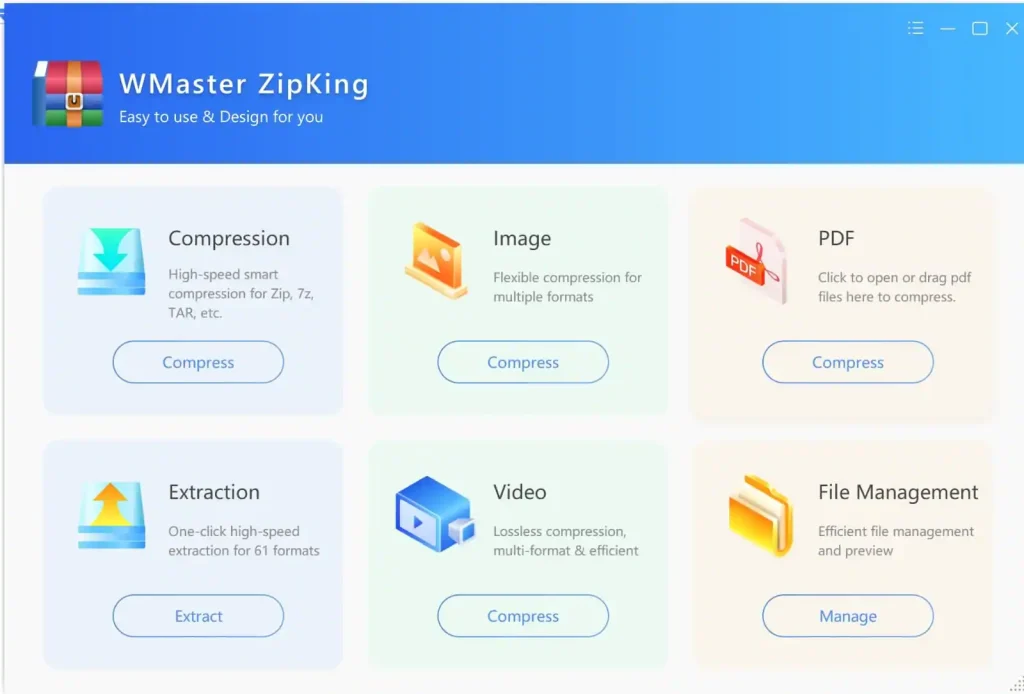
When you open WMaster ZipKing, you’ll see a clean and easy-to-use screen. Everything is well-organized, and the buttons are clearly labeled. Whether you want to unzip a RAR file or compress a video, compress an image, compress a PDF, or manage files, it’s the finest RAR file opener tool.
2. Performance & Speed (Does it Keep Up?)
Speed is important, especially when you’re opening big or broken RAR files. In our test, WMaster ZipKing opened a large RAR file in just a few seconds. That’s more fast as compared to WinRAR and 7-Zip.
We also tested it with some tricky files:
- A RAR file with a password
- A large file split into parts
- A damaged file with missing data
3: Features That Matter (Why It’s Better Than Basic)
- Preview Files Before Opening
This feature is super helpful. Before you extract anything, WMaster ZipKing lets you look inside the file. You can view images, read PDFs, or even check Word documents without opening them fully. It saves time and helps you find exactly what you need without unzipping everything.
- Works With All File Types
WMaster ZipKing doesn’t just work with RAR files. It also supports ZIP, 7Z, TAR, GZip, DMG, WAR, and more, over 64 file formats in total. That means you don’t have to download a bunch of different apps. WMaster ZipKing can open almost anything, all in one place.
Head-to-Head: WMaster ZipKing vs. The Competition
| Feature | WMaster ZipKing | Windows 11 Native | 7-Zip | WinRAR |
| User Interface | Modern & intuitive | Minimal | Dated | Basic |
| Cost | Free (limited time) | Free | Free | Paid (nag screen) |
| Supported Formats | 64+ | RAR and some other formats | 15+ | Limited |
| Password Handling | Built-in & smooth | None | Manual | Yes |
| Archive Preview | Yes | No | No | No |
| Overall Experience | Fast, full-featured | Basic | Powerful but outdated | Reliable, but nags |
How to Extract RAR Files by WMaster ZipKing
The download and installation process of WMaster Zipking involves some key steps, which are listed below.
- Download WMaster ZipKing
To download the software, you can visit the website and find the “Download” option there.
- Open the Application and Click on “Extract.”
When you open the software, you will find a clear interface. Just click on the extract icon.
- Choose your RAR file you want to extract
Select the RAR file that you want to extract.
- Click on “Extract Now.”
When you click on the extract now icon, your file will be extracted and saved in your system.
The Verdict: Is WMaster ZipKing the Best RAR Extractor in 2025?
Yes, we can say without any hesitation that WMaster ZipKing is the best RAR extractor in 2025. We came to this conclusion to find and list the best tool after using multiple software. These tools have multiple features, but some of their drawbacks are so annoying for users.
What brings it to shine is that it does not have charges (for a limited time) to use any of its premium features. So it’s the best time to install the software and try all the features, and get maximum benefits from them.
If you’re looking for a fast, smart, and hassle-free RAR extractor in 2025, you can choose WMaster ZipKing as the best option.
