
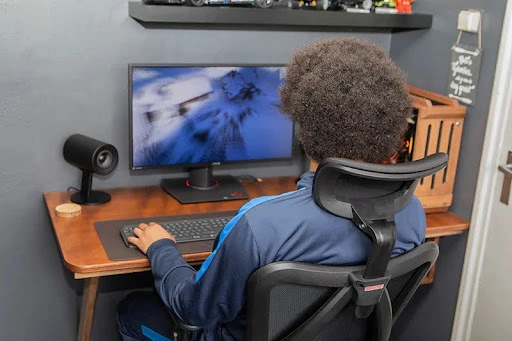
By mid-afternoon, the shoulders creep up, the lower back starts muttering, and focus ebbs away. It isn’t just workload; it’s the way we’re set up at home — perching at the dining table, crouching over a laptop, sharing space with family life. An ergonomic chair sounds like a luxury until you realise it’s the simplest lever for reducing strain and giving your body less to fight against.
Ergonomics isn’t a fad; it’s about fitting work to humans. Tweak a few basics — chair, desk height, screen position, light — and you change how your day feels, not just how it looks.
What ergonomics really means (without the jargon)
Think of ergonomics as “friction control” for the body. When friction drops, good posture happens with less effort. Three principles do most of the heavy lifting:
- Posture: Maintain the natural S-curve of the spine, with the hips slightly open and the shoulders relaxed.
- Support: share load across back, seat, forearms and feet so no single area is overworked.
- Movement: build in frequent micro-changes so blood flow, attention and comfort don’t stall.
Get those right, and you’ll notice fewer aches by lunch and more energy after six.
A five-minute reset that works in real British homes
No spare room? No problem. Use this quick routine each morning:
- Screen at eye line – top of screen at or just below eye height. Laptop users: add a riser plus external keyboard and mouse.
- Elbows ~90° – forearms supported by desk or armrests. If your shoulders shrug, lower something.
- Hips a touch higher than knees – sit back so your lower back actually meets the backrest.
- Feet planted – flat on the floor or on a footrest; dangling feet = tense lower back.
- Two angles, not one – an upright “focus” angle and a gentle “ponder” recline; swap every 30–45 minutes.
Small home, big impact: modular ergonomics
UK homes are cosy and multipurpose. Aim for a set-up that deploys at 9am and disappears at 6pm:
- A fold-flat laptop stand and wireless keyboard that live in a drawer.
- A warm, diffuse task light to cut eye strain on grey afternoons.
- Cable tidy + tray for everyday things like pens, chargers, and notebooks to keep workspaces clean.
- A mobile chair on casters that rolls out for work and tucks away after.
Nothing here screams “corporate” — it simply lets the room become a home again in the evening.
Movement you’ll actually keep
Grand intentions fade; micro-moves stick. Try the 30/30 cue: every ~30 minutes, do ~30 seconds of something — stand for the first minute of a call, heel raises while a file loads, shoulder rolls before “Join meeting”, look 20 feet away for 20 seconds to relax eye muscles. Small resets help maintain blood flow and focus stability.
Sensory ergonomics: light, sound, air
Comfort isn’t only joints and angles.
- Light: daylight if you can; otherwise aim a warm task lamp at the desk, not your eyes.
- Sound: a consistent low backdrop (fan, gentle playlist) can focus better than silence; noise-cancelling helps in lively homes.
- Air & temperature: stale rooms make you wilt; crack a window or run a quiet fan so you stay alert without chill.
The chair question (and why it matters most)
Your chair is the only part of the set-up that touches you for hours. The right ergonomic chair doesn’t force a pose; it follows you through real tasks — leaning in to type, sitting tall for a call, reclining to read. Use this quick buyer’s lens:
- Adaptive lumbar support that stays with your lower back as you move.
- Armrests that adjust up/down, forward/back and pivot, meeting forearms at desk height.
- Headrest that meets (not pushes) your head when you lean back to think.
- Breathable back If you get hot, use (mesh or ventilation).
- Smooth recline with at least two sensible stops (work/think) and an easy, weight-sensitive return.
- Fit: feet flat, hips open, back supported without perching; check seat depth if you’re tall or have long thighs.
Beyond the chair: hands, eyes, desk height
- Desk height: if the desk is high, raise the chair and add a footrest; if low, add risers.
- Hands & wrists: keep wrists neutral; choose a low-profile keyboard and a mouse that fits your hand.
- Eyes: bump text size and use high-contrast themes for long reading blocks.
A gentle illustration (after the principles)
Once those fundamentals are in place, some chairs make the routine effortless. As a reference point — not a hard sell — consider a model that pairs self-adjusting lumbar support (it “tracks” your lower back) with multi-way armrests, a breathable mesh back, and a recline with a few practical stop points. That spec is the sweet spot for many hybrid workers: supportive when you’re heads-down, forgiving when you’re reading, and cool enough for back-to-back calls.
One example that fits this brief is the Sihoo Doro C300. It keeps contact with your lower back as you move, letting you put your arms where your keyboard needs them, and is simple enough for living areas. This is helpful if your office is also your lounge. Use it as a guide to compare possibilities within your budget. If another model has the same adaptive back, armrest range, and breathable comfort, you’re on the right track.
A hybrid-day routine you can keep
- 09:00 Upright focus angle; two deep breaths before email.
- 10:30 Ponder angle for a report; stand for the first minute of the next call.
- 12:30 Lunch away from the screen — genuine eyes-off time.
- 14:00 Reset chair and armrests; quick calf raises.
- 16:00 Window gaze, shoulder rolls, one intentional recline.
- 18:00 Pack away riser/keyboard; let the room become a home again.
Consistency beats intensity.
The takeaway
Ergonomics isn’t about perfection; it’s about reducing friction so you finish the day with energy left for your life. Start with screen height, elbow support, lumbar contact, planted feet, frequent movement and kind lighting. Then choose an Ergonomic chair that follows your day rather than dictating it. If you want a concrete benchmark while you compare, the Sihoo is a sensible reference for adaptive support and low-fuss comfort.
Sit well, finish strong — and make six o’clock feel like your time again.
