Introduction
If you have ever copied a link and ended up with something that looks like a chaotic jumble of percent signs, numbers, and letters — congratulations, you have encountered a URL-encoded string. It looks messy, it reads terribly, and if you are trying to make sense of it manually, it can be downright frustrating. That is exactly where a URL encoder and decoder comes into play, and more specifically, where the SpellMistake tool earns its keep.
The phrase “URL encoder and decoder SpellMistake” might sound like someone fumbled their keyboard while typing — and honestly, that is part of the charm. It started as a common misspelling in search queries, but it has since grown into something much more recognizable. Today, SpellMistake is associated with a free, browser-based tool that helps users encode and decode URLs quickly, without any downloads, signups, or complicated steps.
But here is the thing: knowing a tool exists is not the same as knowing how to use it well. And when it comes to URLs, getting the encoding or decoding wrong can lead to broken links, frustrated visitors, and even SEO headaches. This guide is here to walk you through everything from the basics of URL encoding to practical, real-world ways the SpellMistake tool can save you time and keep your links working as they should.
What Is URL Encoding and Why Does It Matter?
Before we talk about the tool itself, let us get comfortable with the concept. URLs, by design, can only contain a limited set of characters from the ASCII character set. Letters, numbers, and a handful of symbols like hyphens, underscores, and periods are perfectly fine. Everything else — spaces, accented characters, ampersands, question marks, and other special symbols — needs to be converted into a format that web servers can safely process.
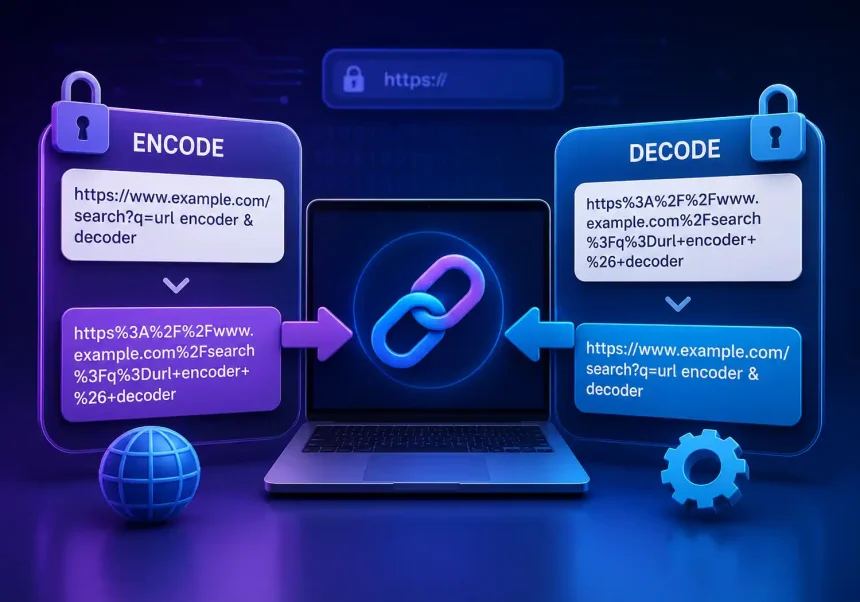
That conversion process is called URL encoding, also known as percent-encoding. It works by taking any unsafe character and replacing it with a percent sign followed by two hexadecimal digits that represent the character’s code. For example, a space becomes %20, an ampersand (&) becomes %26, and the @ symbol transforms into %40.
URL decoding, naturally, is the reverse. It takes an encoded string like hello%20world and turns it back into hello world — something a human being can actually read and understand. Both processes happen constantly behind the scenes whenever you browse the web, submit forms, or share links. But when you need to do it manually — whether for debugging, SEO work, or content management — having a dedicated tool is invaluable.
What Is the URL Encoder and Decoder SpellMistake Tool?
SpellMistake is a free online platform that offers a collection of simple but genuinely useful digital tools — and among them, the URL encoder and decoder stands out as one of the most practical. The tool is designed to do one thing and do it well: take any string of text and either encode it into a URL-safe format or decode an already-encoded URL back into readable form.
The interface is refreshingly straightforward. There is a text box where you paste your input, and with a single click, you get your output. No ads cluttering the screen. No multi-step wizards. No signup wall blocking your access. It works directly in your browser, which means you can use it on any device — desktop, tablet, or phone — without installing anything.
What makes the SpellMistake version particularly interesting is how it handles common mistakes. The name itself — SpellMistake — hints at the reality that people often type “URL encoder” as “URL encoder spellmistake” when searching. The tool has embraced this, becoming synonymous with a forgiving, user-friendly approach to what could otherwise be a dry, technical task.
Key Features of the SpellMistake URL Encoder and Decoder
Instant Encoding and Decoding
The core feature is speed. Paste your text, hit the encode or decode button, and the result appears instantly. There is no processing delay, no animation to wait through — just immediate output. This matters when you are working through a long list of URLs or troubleshooting link issues under time pressure.
Handles Common Encoding Pitfalls
SpellMistake’s tool is built to gracefully handle the special characters that trip people up most often. Spaces, non-ASCII characters, reserved URL symbols — all of these are processed correctly, reducing the risk of a manual encoding mistake that could break your links. For anyone who has ever accidentally corrupted a URL by forgetting to encode an ampersand, this alone makes the tool worth bookmarking.
No Installation or Account Required
Unlike some alternatives that demand you create an account or download software, SpellMistake runs entirely in the browser. You visit the page, use the tool, and move on with your day. For privacy-conscious users, this is a significant advantage — your data is not being stored or tracked.
Cross-Platform and Mobile-Friendly
The tool is responsive, meaning it adjusts to fit your screen whether you are on a 27-inch monitor or a smartphone. Developers, content managers, and SEO specialists who need to check URLs on the go will appreciate not being tethered to a desktop.
Free and Accessible to Everyone
There is no premium tier, no usage limit, and no paywall. The URL encoder and decoder is completely free, making it accessible to students, freelancers, small business owners, and anyone else who needs reliable URL conversion without a budget.
How to Use the SpellMistake URL Encoder
Using the tool to encode a URL is about as straightforward as it gets, but a quick walkthrough never hurts. Here is how to go from a plain text string to a properly encoded URL in seconds.
First, navigate to the SpellMistake website and locate the URL encoder and decoder tool. You will see a large text area prominently placed on the page. Paste or type the text you want to encode into this box. This could be anything — a search query full of spaces, a URL fragment with special characters, or even a block of text that needs to be passed as a query parameter.
Next, identify the encode function. Depending on the interface layout, there will either be separate Encode and Decode buttons or a toggle switch. Click Encode. The tool immediately processes your input and displays the encoded version. Any spaces will be converted to %20 (or +), special characters to their hexadecimal equivalents, and the result will be a string that is fully safe for use in a URL.
Finally, copy the output and paste it wherever you need it — into a browser address bar, an HTML file, an API call, or an email. That is it. The whole process takes less time than reading this paragraph.
How to Use the SpellMistake URL Decoder
Decoding is just as simple and follows the same pattern, just in reverse. Got a messy URL like https%3A%2F%2Fexample.com%2Fsearch%3Fq%3Dhello%20world? Paste it into the text box and click Decode.
The tool strips away all the percent-encoding and returns a clean, readable string: https://example.com/search?q=hello world. This is incredibly useful for debugging. If a link is not behaving the way you expect, decoding it helps you see exactly what parameters are being passed, whether there are hidden redirects, or if any characters were double-encoded by mistake.
One thing to keep in mind: if you are decoding a full URL that you intend to visit, be aware that decoding removes the encoding that makes it safe for browsers. The decoded version is for your eyes only — use the original encoded URL for actual navigation.
Common Scenarios Where URL Encoding and Decoding Saves the Day
Debugging Broken Links
You click a link and it leads to a 404 page. Frustrating, right? Before you assume the page is gone, try decoding the URL. Sometimes the issue is that special characters were not properly encoded in the first place, or they were encoded incorrectly, causing the server to look for the wrong resource. Decoding the URL lets you see what the server is actually receiving and helps you identify where the breakdown happened.
Working With API Calls
If you do any work with REST APIs, you know that query parameters often need to be URL-encoded. A search for “coffee & tea” in an API call needs the ampersand encoded as %26, otherwise the server interprets it as a parameter separator. The SpellMistake encoder makes quick work of this, letting you focus on the logic rather than the syntax.
SEO and Tracking Parameters
UTM parameters, tracking codes, and campaign tags often contain special characters. A single unencoded space can break an entire tracking URL, leaving you with incomplete analytics data. Running your campaign URLs through an encoder before deploying them ensures everything tracks correctly from day one.
Common URL Encoding Mistakes and How SpellMistake Helps Avoid Them
Double Encoding
One of the most common pitfalls is double encoding — where a URL that is already encoded gets encoded again. The result is a string where %20 becomes %2520 (because the percent sign itself gets encoded as %25). This can cause links to break silently. If you decode a URL with SpellMistake and it still looks garbled, double encoding may be the culprit.
Forgetting to Encode Reserved Characters
Characters like ?, &, =, and # have special meanings in URLs. If you want to include them as literal characters in a query parameter value rather than URL syntax, they must be encoded. Forgetting this step leads to parameters being parsed incorrectly. The SpellMistake encoder handles all reserved characters automatically, removing the guesswork.
Encoding Only Part of a URL
It is easy to accidentally encode only the query string while leaving the base URL untouched — or worse, encoding the entire URL including the https:// portion, which can render it unusable. A good practice is to encode only the specific parameters that need it and use the decoder to verify your work. SpellMistake makes this verification step painless.
How SpellMistake Compares to Other URL Encoding Tools
The internet is not short on URL encoder and decoder tools. From browser extensions to developer-focused platforms, there are plenty of options. So why choose SpellMistake?
The biggest differentiator is simplicity. Many competing tools are bundled into larger developer suites that require accounts, come with cluttered interfaces, or push premium subscriptions. SpellMistake keeps things focused. You come, you encode or decode, you leave. There is something almost refreshing about a tool that does not try to upsell you or capture your email.
Performance-wise, the tool handles edge cases well. It correctly processes Unicode characters, manages mixed encoding schemes, and does not choke on long input strings. For everyday use — which is what most people need — it is more than adequate.
That said, if you need batch processing, API integration, or advanced options like custom encoding schemes, you may need to look at more specialized alternatives. SpellMistake is designed for the 95% of use cases, not the niche 5%, and it excels within that scope.
Tips for Getting the Most Out of the Tool
Bookmark It
This might sound obvious, but having the SpellMistake URL encoder and decoder one click away changes how often you use it. When the tool is readily accessible, you are more likely to reach for it during those small moments — checking a link before sending an email, verifying a redirect chain, or cleaning up a messy URL from a spreadsheet.
Use It as a Learning Tool
If you are new to web development or digital marketing, watching how different characters get encoded is a great way to build intuition about how URLs work. Type in a sentence with spaces, punctuation, and special symbols, then encode it. Look at the output. Notice which characters changed and which stayed the same. Over time, you will start recognizing encoding patterns without needing the tool at all.
Pair It With Other SpellMistake Tools
SpellMistake offers more than just URL encoding. The platform includes a suspicious domain checker, a website screenshot generator, and other utilities. Together, these tools form a small but mighty toolkit for anyone who works online regularly. Use them in combination — for example, decode a suspicious-looking URL first, then run the domain through the domain checker for a quick safety assessment.
The Human Side of URL Encoding
It is easy to dismiss URL encoding as a purely technical concern — something developers deal with and everyone else can safely ignore. But in reality, URL encoding touches almost every part of how we experience the web. That link you just shared in a group chat? Encoded. The search results you clicked on? Encoded. The tracking parameters that help a small business understand where its customers come from? Encoded.
Getting encoding right means fewer broken links, better user experiences, and more accurate data. Getting it wrong means 404 errors, lost traffic, and frustration on both sides of the screen. The SpellMistake tool bridges the gap between the technical reality of how URLs work and the practical need for everyday users to get things right without becoming experts in percent-encoding.
And honestly, there is something satisfying about watching a garbled, seemingly random string transform into clean, readable text with a single click. It feels like solving a small puzzle — one that actually matters for your work.
Final Thoughts
Tools are only as good as the problems they solve, and the SpellMistake URL encoder and decoder solves a real, everyday problem for a wide range of people. Whether you are a developer debugging an API integration, an SEO specialist building campaign URLs, a content manager cleaning up messy links, or just someone who wants to understand what that weird-looking web address actually says, this tool earns its keep.
It is free. It is fast. It works on any device. And it handles the edge cases that cause the most headaches. In a digital landscape crowded with overcomplicated software and subscription fatigue, there is genuine value in something that simply works — no strings attached.
Bookmark the SpellMistake URL encoder and decoder today. The next time you encounter a URL that does not look quite right, you will know exactly where to go. And in those few seconds it takes to encode or decode, you will have saved yourself the kind of quiet frustration that builds up when the small things do not work the way they should.
Author Bio
Nathan Cole is a digital tools writer and web technology enthusiast who breaks down technical topics into practical, everyday advice.