
Have you ever wondered what your online profile really says about you? In today’s digital-first world, your online presence often makes the first impression – sometimes even before you have a chance to introduce yourself. Whether it’s a potential employer browsing your LinkedIn, a client visiting your portfolio, or a colleague connecting with you on a team platform, that initial glance at your profile picture can shape how professional, approachable, or trustworthy you appear. A well-crafted photo isn’t just about looking good – it’s about sending the right message from the very first second.
However, traditional photoshoots often take hours to plan and execute. Between scheduling a professional shoot, finding the right outfit, and hoping the lighting works in your favor, creating a polished image can sometimes be costly and stressful. And even after all that effort, you’re usually left with just one look, one outfit, one backdrop. What if you need something more versatile?
Thanks to recent advances in AI, it’s now easier and more affordable than ever to generate high-quality, personalized avatars and professional headshots that reflect who you are. So why not take control of your digital identity with a portrait that truly represents you? That’s where Fotor comes in.
Fotor offers a wide range of editing and design tools, and we’re going to focus on one of its most exciting features: AI Headshot Generator. With Fotor’s AI-powered portrait generator, creating high-quality, professional, and multi-style headshots has never been easier. Whether you need a sleek corporate image for LinkedIn, a friendly profile for your team page, or something more creative for social media, Fotor makes it possible to generate a range of looks in just minutes – no studio, no hassle. Let’s see the smarter, faster, and more flexible way together.
AI Headshot Generator
Fotor’s AI Headshot Generator allows you to instantly turn everyday selfies into high-quality, professional portraits. Whether you need a polished headshot for LinkedIn, a friendly team photo for your company website, or a creative profile picture for social media, this tool offers over 30 styles – from formal studio backdrops to casual outdoor vibes. For example, you can generate a sleek business-style headshot for your resume, a clean and confident portrait for your Zoom profile, or even explore artistic looks like soft lighting or blurred backgrounds for a more relaxed, personal feel. It’s the fastest way to create versatile, studio-quality images – no camera crew required.
- AI LinkedIn Photo Generator for Job Seekers, Freelancers, and Professionals
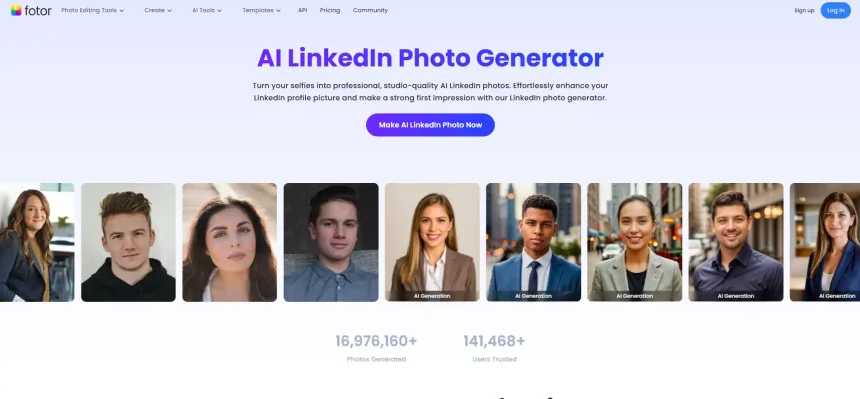
Whether you’re going for a formal, relaxed, or even more artistic vibe, the AI LinkedIn Photo Generator feature makes it super easy to get the look you want. No need to book a photographer or worry about lighting – just a few selfies and a couple of clicks, and you’re good to go. It’s a simple way to create standout headshots that can boost your LinkedIn profile and help you make a strong first impression in a competitive job market. It’s especially useful for a variety of users – whether you’re a recent graduate preparing your first resume, a remote worker updating your company bio, a freelancer shaping your personal brand, or even someone applying for a business visa, a conference badge, or a job overseas. No matter your background, this tool provides a fast and reliable way to present yourself in the best possible light.
Here’s how it works:
Step 1: Pick your gender and 3 to 10 headshot styles that match your vibe.
Step 2: Upload a clear, front-facing selfie.
Step 3: Fotor’s AI creates realistic LinkedIn-ready headshots for you.
Step 4: Preview and download your favorite looks in one click.
There are 38 different styles to choose from, including studio, outdoor, indoor, and creative looks, so you’re almost guaranteed to find one that fits your personality or purpose. I tried it out myself and explored the Professional 1, Professional 2, and Office 2 styles to see how well they would work for a LinkedIn profile. As you can see in the images below, Fotor generated a wide variety of results for each style, giving me plenty of polished options to choose from. All of them look natural, clean, confident, and professional, as if they had actually been taken in a real office or studio setting, not generated by AI.
What more, if you want to fine-tune results, you can further edit your selected headshots directly within the Fotor. It’s ideal for anyone looking to create a trustworthy, capable image without the hassle and cost of a traditional photoshoot.
- AI Profile Picture Generator for Social Media Creators, Gamers, and Everyday Users
Aside from LinkedIn-specific headshots, the AI Profile Picture Generator can also magically transform your selfies into aesthetic, eye-catching avatars – perfect for giving your social media, gaming profiles, or messaging apps a polished and personal touch. Whether you’re updating your Instagram PFP, adding some flair to your TikTok or Discord account, or looking for a creative look for your YouTube channel, dating app, or forum profile, this tool helps you stand out effortlessly with stylish, high-quality visuals that reflect your unique vibe.
You can follow to the following steps to have try:
Step 1: Enter AI PFP generator or upload your selfie.
Step 2: Pick your favorite templates – AI will turn your photo into creative profile pictures.
Step 3: Save your new PFPs with one click, or continue editing in Fotor.
This time, I tried the Sketch, Game Character, and Comic styles – each added a playful, artistic twist that works especially well for TikTok, Discord, and casual platforms like Instagram. As you can see in the examples below, I got multiple versions with different poses, facial expressions, lighting styles, and backgrounds. Despite being AI-generated, the results looked well-refined and natural. The facial features were well-preserved, and none of the images felt overly artificial or generic – each one had its own charm and personality.
- Make AI Headshot Photo from Text for Writers, Designers, and Creative Professionals
Fotor not only allows you to generate AI headshots from uploaded selfies but also lets you create realistic portraits purely from text descriptions – a powerful feature especially useful for writers, designers, marketers, game developers, and other creative professionals. Whether you need a unique face for a fictional character, a mockup for branding visuals, or a stylized portrait for design drafts, Fotor’s text-to-image tool offers a fast and easy solution. Simply describe the look you want, including hairstyle, skin tone, facial features, expression, lighting, and accessories and Fotor’s AI will generate a set of high-quality headshots in seconds. It’s a practical way to visualize people who don’t yet exist, especially helpful for storytelling, visual design, or marketing campaigns.
Like the description I used – “A stylish young woman with long blonde hair, soft makeup, wearing round glasses. Light olive skin tone, gentle smile, head slightly tilted. Clean background, soft natural light.” – I chose the Photorealism style to make the image look like a real-life portrait. The results were remarkably lifelike, from the natural lighting and subtle textures to the warmth in her expression. It felt like I had commissioned a professional photoshoot, but all it took was a single text prompt.
Whether you’re a novelist creating character visuals, a designer building personas, or a brand manager in need of diverse faces for campaigns, this tool gives you the flexibility to bring your ideas to life without needing a model or a camera.

AI Photo Editor
Fotor’s AI photo editor streamlines the editing process, making it significantly easier and faster to enhance images with just a few clicks. It offers a robust suite of intelligent tools, including an AI background remover for effortless subject isolation, an AI object remover to cleanly erase unwanted elements, and an AI image upscaler that improves resolution without compromising quality. Additionally, the AI photo enhancer automatically improves brightness, contrast, and sharpness, while the AI replacer allows users to swap or modify specific elements within a photo, such as faces, skies, or objects for more customized results. These features collectively make Fotor a powerful solution for anyone looking to edit photos efficiently, whether for professional projects or casual content creation.
- AI Background Remover
Fotor’s background remover delivers clean, high-quality results by accurately erasing backgrounds while preserving fine details like hair or fur. After removal, your image stays sharp and natural. You can make the background transparent, switch to solid colors like white or black, or choose from a wide range of preset scenes – indoor, outdoor, and more. For added creativity, you can even generate custom AI backgrounds.
Take the following picture as an example. I want to change the background to somewhere indoors. With just one click, this feature can automatically analyze my picture and remove the original background. You can see the result is clean and natural. If I want to change the background to something more fitting – like the photography backdrop – I can simply choose from Fotor’s preset background options. These presets are especially useful for creating professional-looking photos. I tried a few of the backgrounds, and they instantly give the image a more polished and formal look suitable for professional use.
If I’m looking for something more personalized or creative, I can also use the AI background generator by typing a short text prompt – like “sunset beach,” “modern conference room,” or “minimalist white wall with soft shadows.” The AI will then generate a realistic background that blends naturally with the subject. This flexibility makes it easy to match your image to any context, whether it’s for business, creative portfolios, or social media branding.
Pros
- User-friendly interface
- Supports post-generation editing for customization
- Realistic facial rendering
- Fast and diverse AI headshot generation
Cons
- Dependence on original photo quality
- Free plan limitations
How Much Does Fotor Cost?
Free Plan
Great for casual use. Includes basic editing tools and filters, but with ads and limited access to high-res exports and premium features.
Fotor Pro – $8.99/month or $39.99/year
Removes ads, unlocks high-res exports, more templates, fonts, and advanced editing tools like AI enhancements.
Fotor Pro+ – $19.99/month or $89.99/year
Includes everything in Pro, plus 4K exports, advanced AI tools (e.g., background remover, AI generator), priority support, and more commercial-use resources—ideal for professionals and businesses.
Besides, while Fotor offers Pro and Pro+ subscription plans that unlock many advanced AI editing tools and give users access to credits, the AI Headshot Generator is not included in any subscription or free credit plan. It is a standalone, pay-per-use feature that requires an additional purchase.
Summary
Fotor stands out as a user-friendly and versatile platform that simplifies the process of creating professional-looking headshots and creative profile pictures through AI. One of its biggest advantages lies in the power of AI-generated portraits, offering a fast, affordable, and highly customizable alternative to traditional photography. Whether you need a polished corporate photo for LinkedIn or a more playful, stylized image for social media, Fotor’s AI headshot generator produces realistic and visually appealing results in minutes, all from a simple selfie or a short text description.
The flexibility to generate portraits from either images or text prompts opens up new creative possibilities, especially for users who may not have access to ideal reference photos. And thanks to Fotor’s built-in editing tools, users can continue refining the generated headshots to suit their exact vision.
While some advanced features are locked behind paid plans and detailed control over facial elements remains limited, the platform’s speed, versatility, and creative freedom more than make up for it. If you’re looking for a hassle-free way to create eye-catching portraits or polish your photos with AI, Fotor delivers an impressive balance of quality, convenience, and value.

