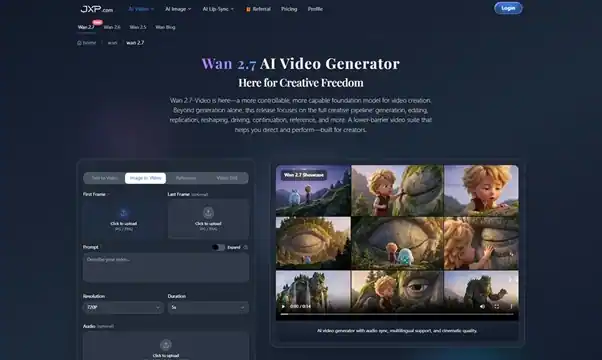
Creating high‑quality videos used to require professional tools, manual editing, and hours of tweaking. Ever since I started using Wan 2.7, that experience has changed dramatically. This AI‑driven video generator brings powerful automation and creative control together — letting me produce polished visuals without complex software or steep learning curves.
Turning Simple Inputs Into Realistic Videos
The first time I tried Wan 2.7, I uploaded a reference image and added a short prompt describing camera motion and scene mood. Within minutes, I had a generated video that looked like it was created by a professional production team.
Here’s how the process works in everyday use:
- Upload Reference
Start by uploading a single image — this becomes the foundation for your video. Wan 2.7 uses it to guide visuals, framing, and consistency throughout the clip. - Write Your Prompt
Whether you’re describing motion (e.g., camera pan and zoom), scene atmosphere, and characters in the motion, prompt tells the AI how to shape narrative. It took only and few descriptive lines for system to capture my intent. - Generate and Refine
Hit generate, and Wan 2.7 renders your video. The first result is often impressive, but the ability to iterate quickly means I can refine mood, pacing, or effects in subsequent versions with small prompt changes.
The result? Fast turnaround and visual results that feel natural — even for complex scenes.
Why Wan 2.7 Stands Out in the AI Video Landscape
After using this tool on multiple projects, I’ve noticed several factors that make Wan 2.7 genuinely useful for creators, marketers, and storytellers:
- Superior Output Quality — The model produces videos with smooth motion flow, consistent visual identity, and sharp details that reflect real world cinematography.
- Creative Control Meets Simplicity — Features like start/end frame input and grid image generation give you influence over composition and pacing without overwhelming settings.
- Style Customization — You can blend stylistic references and stylistic modes to tailor output to your project’s tone and audience.
- Fast Iteration — Ideal for content teams or independent creators who need professional results on a tight schedule.
If you want to explore how this AI video engine works in practice, visit Wan 2.7 AI Video Generator and view examples firsthand.
Practical Use Cases That Changed My Workflow
Here are a few ways Wan 2.7 has become invaluable in my projects:
📹 Social Media Content
Short, snappy clips that look custom‑produced — perfect for platforms like Instagram Reels or TikTok.
📈 Marketing and Growth Videos
Create promo visuals, landing page videos, and campaign content without needing external editors.
💼 Product Storytelling
For startups and SaaS brands, this tool helps visualize feature walkthroughs, launch trailers, and narrative content that resonates.
📚 Education and Team Training
Transform scripts and tutorials into engaging motion content, scaling learning materials faster than traditional production.
Whether it’s social engagement, instructional content, or polished marketing materials, the output feels professional with significantly less effort.
Tips for Getting the Best Results with Wan 2.7
Here’s what I’ve learned from hands‑on use:
✅ Be Precise with Prompts
Clearly describe desired motion, focus points, and mood — the AI interprets detailed instructions well.
✅ Use Reference Images Strategically
Start with a compelling reference image — it anchors visual coherence and makes the generated video feel contextually grounded.
✅ Iterate Early and Often
Generate multiple versions and compare subtle differences — sometimes changing just one phrase in a prompt can elevate the aesthetic.
✅ Combine Visual Styles
Experiment with blending references to achieve unique results or thematic consistency across multiple videos.
These small techniques help unlock the full creative potential of the model.
Final Thoughts: AI Video Creation Without Limits
For anyone exploring digital storytelling, content marketing, or product demonstrations,Wan 2.7 offers a fresh approach to video creation. It removes technical barriers, accelerates production, and opens new creative possibilities — all while maintaining control and quality.
Instead of wrestling with manual editing tools or outsourcing production, I’m now able to get professional results directly from my ideas and prompts. As video continues to dominate online engagement, having a tool like Wan 2.7 in your creative toolkit isn’t just a convenience — it’s a strategic advantage.