Most video ideas do not begin with a blank page. A creator may already have a product photo, a short phone clip, a campaign image, a soundtrack, or a rough storyboard. The harder part is turning those pieces into a video concept quickly enough to test.
That is where Seedance 2.0 becomes interesting. It gives users a way to build short AI videos from text prompts, images, audio and video references, so the creative process starts with assets people already have.
From Static Assets to Moving Concepts
A small ecommerce brand might have clean product shots but no budget for a fresh video shoot every week. A creator might have a moodboard but not enough time to animate it. A startup might need a short explainer before a pitch meeting.
In each case, the first need is not a finished commercial. It is a moving draft that helps the team decide whether the idea works.
That first draft is often where momentum is won or lost.
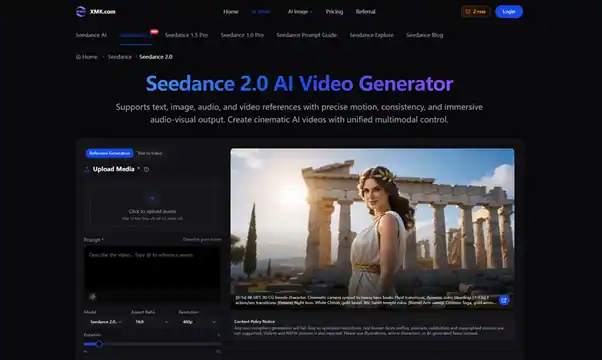
Seedance 2.0 supports up to 12 uploaded assets, including images, video clips and audio files. That means a user can bring in a product photo, a movement reference and a sound cue, then describe the kind of video they want to generate.
Why References Feel More Natural Than Prompts Alone
Anyone who has tested AI video tools knows the frustration: the clip may look impressive, but the product, motion or timing feels slightly off.
Text prompts can describe a scene, but they often struggle with exact visual identity. A reference image can show what the product should look like. A video reference can show the type of motion. Audio can suggest rhythm, energy or atmosphere.
With Seedance 2.0 AI Video Generator, those references become part of the brief. The user is not only asking for a video; they are giving the system examples of what matters.
Practical Scenarios Where It Fits
For a TikTok product teaser, a brand could upload a product image, add a fast-paced audio cue and ask for a short reveal with a close-up ending.
For a Shopify landing page video, an ecommerce team could turn a hero product image into a smooth motion clip that feels more engaging than a static banner.
For a startup explainer, a team could use a first visual concept and create a short scene that shows a product benefit before building a polished demo.
For a creator storyboard, a still image or reference clip can become a quick motion test before the creator spends hours filming or editing. These are small, practical uses. They are also the kinds of use cases where speed matters.
Short-Form Content Needs Quick Revision
Short-form content rarely works on the first try. A hook may need to be faster. A product shot may need a longer ending. A transition may feel too slow once paired with music.
Seedance 2.0 includes options such as video extension, merging multiple videos, replacing characters and refining small segments without full regeneration. These controls are useful because a near-good clip should not always require starting again.
For a social media team, that can mean testing several versions of a product reveal. For a brand team, it can mean keeping the best part of a clip while improving the weaker section. For a creator, it can mean trying motion ideas before filming.
It is a small difference on paper, but it changes how people experiment.
Audio Can Change the Whole Clip
A video may look polished and still feel flat if the sound does not match. This is especially true for Reels, Shorts and TikTok, where timing often decides whether a viewer keeps watching.
Seedance 2.0 highlights audio-video synchronization and immersive audio-visual output. A calm skincare teaser, a high-energy sneaker launch and a cinematic travel clip all need different pacing. Adding audio direction early helps the video feel planned rather than patched together later.
A Simple Way to Start
The easiest workflow is to begin with one clear goal. Is the clip for a product page, a social post, a pitch deck, or a storyboard?
Next, choose the strongest reference. Use a clear image if the product or character must stay consistent. Use a video reference if the motion matters. Use audio if timing is part of the idea.
Then write the prompt like a short creative note: subject, camera movement, lighting, mood, rhythm and ending. This makes creating short-form videos with Seedance 2.0 feel closer to briefing a designer than rolling the dice on a prompt.
What to Check Before Publishing
Seedance 2.0 also includes a content policy notice covering unsupported real human faces, copyrighted content, violent content and NSFW material. For public-facing work, those checks matter.
Final Thoughts
For many teams, the hardest part is not creating the final video. It is getting from idea to first draft fast enough to keep momentum.
For creators, ecommerce teams and marketers, that can make a real difference. A product photo can become a teaser. A campaign image can become a motion concept. A storyboard can become something people can actually watch, discuss and improve.